

Teensyduino
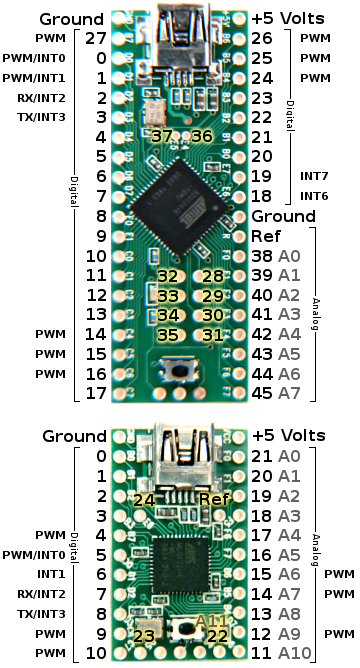 |

Running Sketches on the Teensy
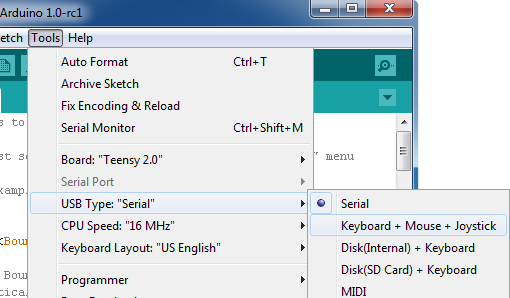
Most programs written for Arduino work on Teensy. All of the standard Arduino functions (digitalWrite, pinMode, analogRead, etc) all work on Teensy. Teensyduino is also compatible with many Arduino libraries.Teensy is not limited to only serial device type. The Tools > USB Type menu can select the type of device Teensy will become when it runs your sketch.
All communication is performed at full native 12 Mbit/sec USB speed. Serial includes built-in flow control, so the effective speed will be as fast as your code can read, but unlike Arduino, you will not lose incoming data if your sketch does not use Serial.read() quickly. When implementing Serial mode, maximum speeds of approximately 1 Mbit/sec are commonly achievable.
Teensy has the same built-in peripherals as Arduio: analog inputs,
SPI, I2C, PWM, and a real serial port. For applications
that need the serial port (MIDI, GPS modules, etc), Teensy is very
easy to use, because uploading takes place on the USB port, which
is not shared with serial.
How Does Teensy 2.0 Compare With Arduino?
On May 19, 2012, Arduino Leonardo was released, using the same ATMEGA32U4 chip as Teensy 2.0. Currently no Arduino board offers hardware similar to Teensy++ 2.0.Both Teensy 2.0 and Arduino Leonardo support USB Serial, Keyboard and Mouse. Both have similar compatibility with all Arduino-based code. But there are several differences:
Teensy 2.0
|
Arduino Leonardo
|